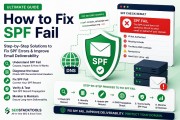
SPF (Sender Policy Framework) is a DNS record that tells the world which mail servers are allowed to send emails from your domain. Without it, spammers can easily forge your domain, and your legitimate emails are far more likely to land in the spam folder.
⚡ Quick SPF Health Check
Is your SPF record correctly published? Use our free SPF, DKIM & DMARC Checker to instantly verify your live DNS records. No signup required.
What Exactly is an SPF Record?
An SPF record is a line of text added to your domain's DNS (Domain Name System) settings. It acts like a digital guest list for your email domain. It explicitly lists all the IP addresses and hostnames that are authorized to send email messages on your behalf.
When a receiving mail server (like Gmail, Yahoo, or Outlook) gets an email that claims to be from your domain, it doesn't just trust the "From" address. It checks your SPF record first. If the server that sent the email is on the list, the check passes. If it's not on the list, the check fails, and the email is likely to be flagged as spam or rejected entirely.
Think of it this way: your domain is a VIP club. The SPF record is the bouncer's list. If a sender's name (IP address) is on the list, they get in (inbox). If not, they get turned away (spam/bounce).
Why is SPF Critical for Your Business?
You might wonder, "Do I really need an SPF record?" The answer is a resounding yes, especially if you send any kind of email—marketing, transactional, or internal. Here is why:
- Prevents Email Spoofing and Phishing: Attackers often forge the "MAIL FROM" address to make it look like an email came from a trusted domain (yours). This is called spoofing. SPF stops this because the attacker's server won't be on your authorized list.
- Improves Email Deliverability: Mailbox providers are strict. If your domain lacks an SPF record, or if it's misconfigured, your emails will fail authentication checks. This significantly increases the likelihood of your emails going to the spam folder, killing your open rates and ROI.
- Essential Foundation for DMARC: DMARC (Domain-based Message Authentication, Reporting & Conformance) builds upon SPF and DKIM. You cannot enforce a strict DMARC policy (which stops phishing) without a properly configured SPF record.
- Protects Your Sender Reputation: Mailbox providers track your domain's reputation. High bounce rates or failed authentications damage your reputation, making it harder for all your emails (even to engaged users) to get through.
How Does SPF Work? (A Step-by-Step Look)
To truly understand SPF, it helps to see the journey of an email from the sender's server to the recipient's inbox.
- An Email is Sent: A mail server (e.g., your ESP's server) attempts to deliver an email to a recipient. The email has a "Mail From" (also known as the envelope sender) address that uses your domain, e.g.,
[email protected]. - Receiver Performs a DNS Query: The receiving mail server (say, Gmail) receives the email and wants to check if the sending server is allowed to send mail for
yourdomain.com. It performs a DNS lookup to retrieve the SPF record foryourdomain.com. - The SPF Record is Evaluated: The receiving server reads the record. The record contains mechanisms (like
include,ip4,a) that point to specific IPs or subnets. - The IP Address is Matched: The server checks the IP address of the server that sent the email against the IPs listed in the SPF record (including those included via
include:mechanisms). - Enforcement is Applied:
- Pass: The IP matches. The email passes the SPF check.
- Fail: The IP does not match. The receiver looks at the policy qualifier (usually
~allfor softfail or-allfor hard fail). If it's-all, the email is typically rejected. If it's~all, the email is accepted but flagged as suspicious, often leading to the spam folder.
Anatomy of an SPF Record: Breaking Down the Syntax
An SPF record is a single line of text in your DNS. Here is a common example:
v=spf1 include:_spf.google.com include:sendgrid.net ~allLet's break down each part:
v=spf1: This is the version identifier. It tells the receiving server which version of SPF is being used. The current version is "spf1".include:_spf.google.com: This is a mechanism. It tells the server to include the SPF records of_spf.google.com. This is the standard way to authorize Google Workspace (Gmail) to send emails on your behalf. It effectively imports Google's list of authorized mail servers.include:sendgrid.net: This authorizes SendGrid to send emails on your behalf. If you use multiple services (Mailchimp, Amazon SES, etc.), you will have multipleinclude:statements.~all: This is the qualifier. It defines the default policy for servers that are not listed.~all= SoftFail. The server is not authorized, but the receiving server can use its own judgment. (Recommended for starting out).-all= Fail. The server is not authorized, and the email should be rejected (or heavily penalized). Use this only when you are absolutely certain you have listed every legitimate sender.+all= Allow all. Extremely dangerous. Do not ever use this.
SPF Mechanisms: More Than Just "Include"
While include: is the most common, SPF has several other mechanisms to authorize senders:
ip4:192.0.2.1: Authorizes a specific IPv4 address.ip4:192.0.2.0/24: Authorizes a range of IPv4 addresses.ip6:2001:db8::1: Authorizes a specific IPv6 address.a: Authorizes the IP address of your domain's A record.mx: Authorizes the IP addresses of your domain's MX (mail exchange) records.exists: Executes a DNS query to check if a condition is met. Rarely used in practice.
The Infamous 10-DNS-Lookup Limit
This is one of the most common "gotchas" with SPF. The SPF specification limits the number of DNS lookups a receiving server can perform while evaluating an SPF record to 10.
Each include:, a:, mx:, ptr:, or exists: mechanism counts as a lookup. If you exceed 10 lookups, the SPF check returns a PermError, and the email fails authentication even if the sending IP is legitimate.
How to avoid it:
- Consolidate your ESPs. Do you really need Mailchimp, SendGrid, and Klaviyo all sending from the same domain? Consider using a single primary ESP.
- Use "Flattening" (if your ESP supports it). Some providers allow you to expand their
include:records into a list of raw IPs. This substitutes a lookup for a direct IP match.
Setting Up Your SPF Record (Step-by-Step Guide)
Setting up an SPF record is easier than you think, especially with our tools. Here is the recommended workflow:
- Audit Your Sending Sources: Make a comprehensive list of every service that sends email on behalf of your domain. This includes:
- Google Workspace / Gmail
- Microsoft 365 / Outlook
- Email marketing platforms (Mailchimp, Klaviyo, SendGrid, Constant Contact)
- Transactional email services (Amazon SES, Postmark, Sendinblue)
- Your own web server (e.g., contact forms sending via PHP mail).
- Generate Your Record: The fastest way is to use our free SPF Record Generator. Select the services you listed, add any custom IPs, and choose your enforcement level (we recommend starting with
~all). - Add the Record to Your DNS: Log in to your domain registrar or DNS hosting provider (e.g., GoDaddy, Cloudflare, Namecheap, AWS Route 53). Navigate to the DNS management zone. Create a new TXT record.
- Host/Name: Usually
@(or your bare domain, e.g.,yourdomain.com). - Value/Content: Paste the entire SPF string generated by the tool (e.g.,
v=spf1 include:_spf.google.com ~all). - TTL: Leave as default (3600 or 300 is fine).
- Host/Name: Usually
- Verify Propagation: DNS changes can take a few minutes to 48 hours. However, after a few minutes, use our SPF, DKIM & DMARC Checker to verify your record is live and syntactically correct.
- Test it Live: Send a real email using your setup and use the Email Tester to confirm the SPF check passes.
Common SPF Errors and How to Fix Them
- No SPF Record Found: Your domain is vulnerable to spoofing. Solution: Generate a record immediately.
- Multiple SPF Records: You have added a new TXT record without removing the old one. The SPF spec explicitly forbids this and causes a PermError. Solution: Merge them. Combine the mechanisms from both records into one single TXT record and delete the duplicate.
- 10-Lookup Limit Exceeded: You have too many
include:statements. Solution: Flatten the record or reduce the number of included services. - Syntax Error: A missing space, dot, or wrong qualifier. Solution: Use our SPF Generator to ensure perfect syntax.
SPF vs. DKIM: What's the Difference?
People often confuse SPF and DKIM. Here is the simplest breakdown:
- SPF (Sender Policy Framework) focuses on the server. It checks if the sending IP address is allowed to send mail for the domain.
- DKIM (DomainKeys Identified Mail) focuses on the message. It uses cryptographic signatures to verify that the email content hasn't been tampered with and is indeed from the domain.
You need both for robust authentication. SPF is easier to set up, but it breaks easily with email forwarding. DKIM survives forwarding because the signature travels with the message. Together, they form the bedrock of a good deliverability strategy, which is then governed by DMARC.
Frequently Asked Questions
Can I have more than one SPF record?
No. A domain must have exactly one SPF TXT record. Having two is explicitly invalid per the SPF specification and can cause all your mail to fail SPF checks. Always merge new mechanisms into the existing record.
Should I use ~all or -all?
Start with ~all (SoftFail) while you test and confirm every legitimate sender is correctly listed. Once you are confident your record is complete and accurate, switch to -all (Fail) for stronger protection against spoofing.
What is the 10 DNS lookup limit?
The SPF spec limits evaluation to 10 DNS lookups. Each include:, a:, mx:, etc. counts as one. Exceeding this causes a "permerror" and the SPF check fails for all mail.
Does SPF alone stop email spoofing?
Not completely. SPF only protects the envelope sender address and breaks under simple forwarding. Pair it with DKIM (message signing) and DMARC (policy enforcement) for comprehensive protection.
How long does it take for SPF changes to go live?
DNS propagation usually takes a few minutes to a few hours depending on your DNS provider and the record's TTL, though it can occasionally take up to 48 hours globally.
Conclusion
SPF is a non-negotiable foundation of email deliverability. By authorizing your legitimate sending servers and providing a clear policy for unauthorized attempts, you protect your domain reputation, significantly improve inbox placement, and build a stronger defense against phishing attacks.
If you haven't set up SPF yet, use our free generator now—it takes less than 5 minutes. If you already have it and are facing issues, check your configuration with our live checker.